What is a Configuration Management Database (CMDB)?

A configuration management database (CMDB) is a repository of records about the configuration items (CIs) an organization manages. Those items include servers, applications, services, network devices, and cloud resources, along with their attributes and the relationships between them. IT service management (ITSM) teams use the CMDB for change, incident, and audit work.
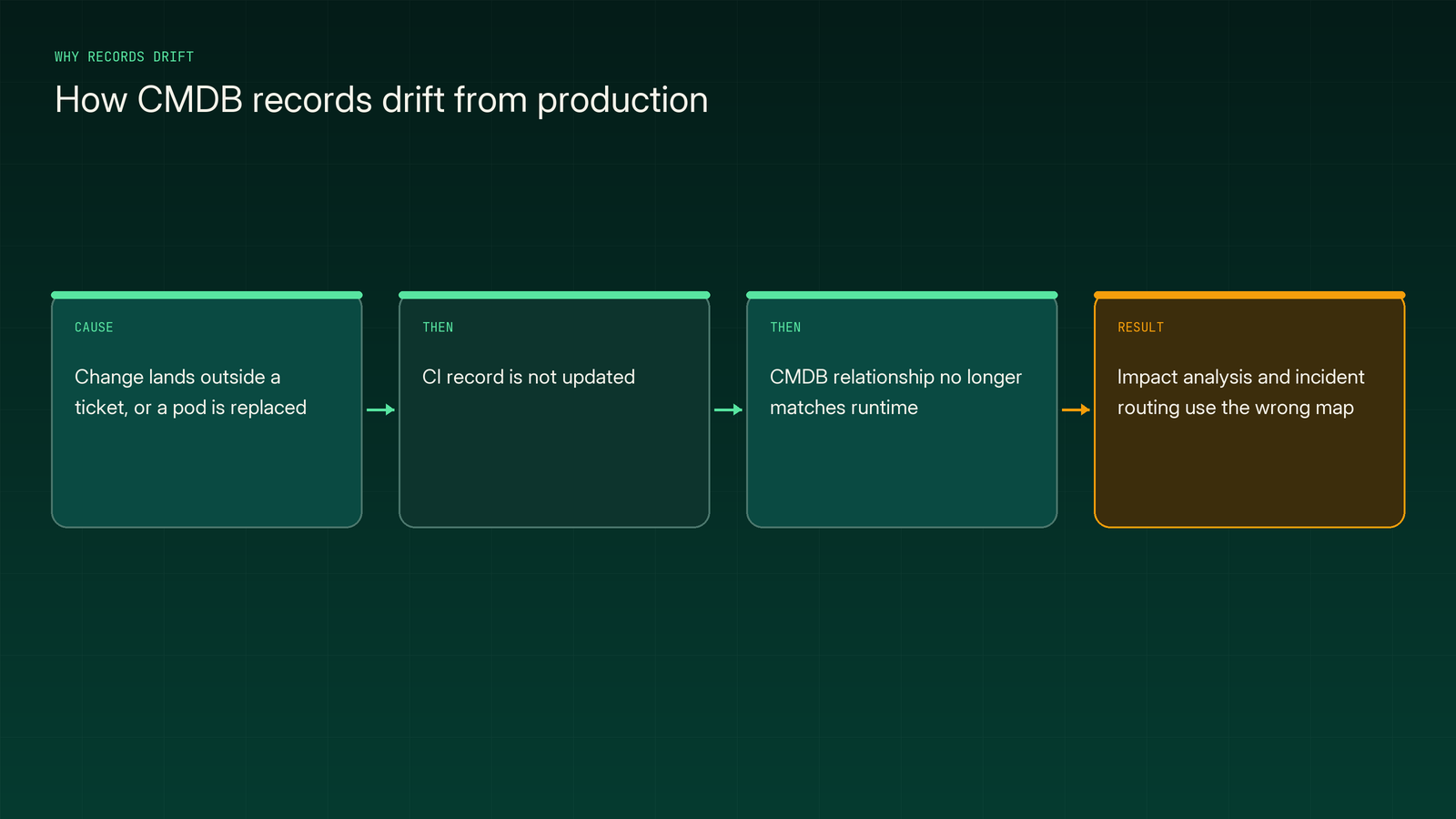
Production keeps moving after a record is written, so the recorded map drifts from the one production actually uses. Incident diagnosis depends on the runtime map, which is why teams pair CMDB records with a live causal model for root cause analysis.
Book a demo to see how Traversal maps the dependencies your CMDB can't keep current.
How does a CMDB fit into IT service management?
In ITIL, a framework of IT service management practices, the CMDB is the data store inside a broader configuration management system. What separates it from a plain asset list is relationships: it records how things connect, not just what exists. By design, it is a system of record fed by discovery, integrations, and change processes, not live telemetry from running systems.
What are configuration items (CIs)?
A configuration item (CI) is any component an organization chooses to manage as a single unit in its CMDB. Examples include a server, an application, a database, a network device, a cloud resource, or a business service.
NIST defines a configuration item as an aggregation of system components designated for configuration management and treated as a single entity. In practice, a CI can be as large as a whole system or as small as one software package.
- Hardware: Physical servers, storage arrays, routers, switches, and load balancers.
- Software: Applications, databases, middleware, and the versions installed on each host.
- Cloud resources: Virtual machines, managed databases, storage buckets, and Kubernetes clusters.
- Services: Business and technical services that group the CIs behind a customer-facing capability.
- Documentation: Runbooks, architecture diagrams, and contracts, when a team chooses to manage them as CIs.
Scoping CIs is a decision, not a given. Every CI class you add creates records someone must keep accurate, so scope sets the maintenance bill for everything that follows.
What information does a CMDB store?
A CMDB stores three kinds of information about each CI: its attributes, its relationships to other CIs, and its change history. Each kind answers a different operational question.
- Attributes: Name, owner, version, location, environment, and support group. These fields drive routing, reporting, and compliance checks.
- Relationships: Links such as "runs on," "depends on," "connects to," and "supports." They let teams estimate what a change or failure will touch.
- Change history: Versioned records tied to change requests and incidents. They show what was modified, when, and under which approval.
Relationships carry the most value and are the hardest to keep true. Attributes change occasionally, but connections between services shift with every deploy, scaling event, and configuration push.
Why does a CMDB matter?
A CMDB matters because change, incident, and security work all depend on knowing what exists, who owns it, and what else it touches. Without that context, change reviews and pages start from guesswork. Incidents are where record gaps cost the most, because responders act on the map while customers wait.
Change risk is the clearest driver. Google's Site Reliability Engineering book (2016) reported that roughly 70% of outages were due to changes in a live system.
- Change impact analysis: Relationship data shows which services, hosts, and databases a proposed change will touch. Reviewers can approve, stage, or block it with context.
- Incident routing and ownership: CI owner and support-group fields get the right team paged. Responders skip the hunt for whoever runs a failing component.
- Security and vulnerability management: Teams can't patch software they don't know they run. The CMDB gives patch programs an inventory to check against.
- Audit and compliance: Auditors expect an inventory that reflects the system as it runs. Federal security audits test whether component inventories are accurate.
Complexity raises the stakes. Uptime Institute's 2025 outage analysis found IT and networking issues made up 23% of impactful 2024 outages, likely from complexity-driven change management and misconfiguration issues.
How does a CMDB work?
A CMDB works by collecting CI data from discovery tools and integrations, then reconciling it into single records. It maps relationships between those records and updates them through change management.
It starts with scope. Teams decide which CI classes support the change, incident, and audit decisions they actually make, name an owner for each class, and document its required attributes.
Next comes discovery. Agent-based or agentless scans, cloud provider APIs, and deploy tool integrations feed CI data in, with manual entry reserved for classes that rarely change. Every record should carry its source.
Because several sources often describe the same component, the CMDB then reconciles them. Identification rules, such as a serial number or cloud instance ID, decide when two records are the same CI. Source precedence decides which source wins when attributes conflict.
With clean records in place, the CMDB maps relationships. Discovery finds some connections, such as open ports and host-to-application links, and teams declare others through service maps. Each application CI gets linked to its hosts, databases, and business services.
Finally, change control and audits keep records current. CIs are updated when change requests close, and health checks flag stale, orphaned, and duplicate records, including any CI that discovery hasn't seen within its expected window.
Discovery runs on a schedule, so every record is a snapshot of the moment a scan finished. Between scans, the CMDB reflects the last known state rather than the running state.
What is the difference between a CMDB and IT asset management (ITAM)?
IT asset management (ITAM) tracks assets as financial and contractual objects over their lifecycle. A CMDB tracks configuration items as operational components and maps how they depend on each other. ITAM answers what you own and what it costs, while a CMDB answers what is running and what it connects to.
The two are complementary and often synchronized. For hardware, asset and CI records usually map one-to-one, with different fields on each.
- When it's consulted: The CMDB during change reviews, incidents, and audits. ITAM during budgeting, renewals, and procurement.
- Who relies on it: The CMDB serves on-call engineers and change approvers. ITAM serves finance, procurement, and license managers.
- What breaks if it's wrong: CMDB errors send incidents to the wrong owner or hide impact. ITAM errors distort license counts and spend.
- How often it changes: CMDB records change with operations. ITAM records change mainly at purchase, renewal, and disposal.
What are the types of CMDBs?
The main CMDB models are unified, federated, and hybrid. Each one makes a different tradeoff between central control and duplicate data entry.
- Unified: One central database holds every CI and relationship. Governance is simple, but every team feeds the same system.
- Federated: Source systems stay authoritative for their own domains and link under a common model. Duplicate entry drops, but reconciliation grows.
- Hybrid: A central core holds shared CIs and pulls detail from specialized sources such as cloud inventories. It balances control with local ownership.
Cloud-native environments often push teams toward federated models fed directly by cloud provider APIs.
Why do CMDBs go stale?
CMDBs go stale because they record configuration at a point in time, while production keeps changing between discovery runs and change tickets. The decay is structural, not a missing feature: a CMDB is built as a system of record, and records lag what they describe.
Cloud-native infrastructure makes the lag visible. Kubernetes documentation describes Pods, the smallest deployable units in a cluster, as relatively ephemeral, disposable entities. Containers, pods, and autoscaled instances appear and disappear between the scans meant to record them.
- Changes outside the change process: Deploys, feature flags, and config pushes often land without a ticket. The CMDB never hears about them.
- Discovery blind spots: Scans capture inventory well but miss runtime call paths and business context. A host shows up, but its live callers don't.
- Ownership drift: Teams reorganize and services change hands. Owner fields keep pointing at people who have moved on.
- Skipped reviews: Health checks and accuracy reviews slip when teams are stretched. Small errors compound until records stop matching reality.
Skipped reviews show up in audit findings. In AmeriCorps' fiscal year 2024 federal information security audit, auditors found that 6% of the agency's deployed end-user devices, such as workstations, monitors, and printers, were listed with the wrong state. They cited errors importing data into the agency's CMDB and skipped monthly accuracy reviews as contributing factors, in a finding scoped to that one agency.
The result is a system teams learn to double-check rather than trust, because it's being asked to match infrastructure that changes on its own schedule.
What are CMDB best practices?
The most effective CMDB practices are to scope narrowly around critical services, automate data collection, assign clear CI ownership, and measure data health continuously. Treat each one as a standing operating habit, not a one-time project.
Step 1: Start with the services that matter most
- Criteria: Pick the customer-facing and revenue-critical services where change and incident decisions carry the most risk.
- Inputs: Service catalog, incident history, and business impact ratings.
- Actions: Model those services and their direct CIs first, then expand only while the data stays healthy.
Step 2: Automate discovery and integrations instead of manual entry
- Criteria: Give every CI class that changes more than occasionally an automated source.
- Inputs: Cloud provider APIs, Kubernetes APIs, deploy pipelines, and network discovery scans.
- Actions: Replace spreadsheet imports with scheduled or event-driven feeds, and record the source on every attribute.
Step 3: Assign owners and reconciliation rules
- Criteria: Give every CI class one accountable owner and one rule for identifying duplicates.
- Inputs: Org charts, on-call rotations, and source precedence decisions.
- Actions: Publish identification rules, set source precedence, and review ownership after every reorganization.
Step 4: Tie updates to change management
- Criteria: Require any change that alters a CI to update that CI when the change closes.
- Inputs: Change requests, deployment events, and configuration pushes.
- Actions: Link change tickets to CIs, and flag deploys that reached production without a matching change.
Step 5: Measure CMDB health on a fixed cadence
- Criteria: Score completeness, correctness, staleness, and orphaned CIs for each class.
- Inputs: Discovery results, reconciliation logs, and audit samples.
- Actions: Publish a health score, review it monthly, and fix the weakest class before adding new ones.
Step 6: Don't rely on recorded relationships for runtime questions
- Criteria: Flag incident questions that depend on runtime behavior, such as which dependency carried a live failure.
- Inputs: Postmortems where CMDB data misled or delayed responders during an incident.
- Actions: During incidents, answer runtime dependency questions from a model built continuously from telemetry and code.
Can a CMDB support root cause analysis?
A CMDB supports root cause analysis (RCA) by telling responders what a failing component is, who owns it, and what changed on record. It cannot show which runtime dependency actually carried the failure.
The CMDB earns its place at the start of an investigation. Ownership data gets the right people involved, recent recorded changes give responders a first lead, and declared service context shows which business capability is at risk.
Its usefulness ends where the failure path leaves the record. Incidents often surface several dependencies away from their cause, through service calls, message queues, shared databases, and network paths the CMDB may never have captured. Recorded relationships describe what someone declared or discovered at scan time. Observed dependencies describe what production actually used while it failed.
Correlation across CMDB neighbors isn't causation either. A database throwing errors next to a failing service proves adjacency, not cause. That's the gap a live causal model fills: it learns dependencies continuously from telemetry and code, then traces a failure through the paths production actually used, rather than the ones last written down.
How should teams use a CMDB during incidents?
A CMDB is built for change management, ownership, and compliance work. It matters most before an incident starts and after it ends: during change reviews, audit prep, and postmortems.
During the incident itself, recorded relationships can get responders oriented but can't trace a failure through runtime dependencies nobody wrote down. That work needs a map of production as it runs, learned continuously from telemetry and code rather than maintained by hand.
A CMDB tells you what should be connected. A model built from live production shows you what is connected, and why it broke.
FAQ
CMDB stands for configuration management database, the repository IT service management teams use to store configuration items, their attributes, and their relationships.
A CMDB stores attributes, relationships to other CIs, and change history for each configuration item. Attributes include fields like name, owner, version, location, environment, and support group, while relationships capture how CIs connect and depend on each other. Change history records what was modified, when, and under which approval.
The ServiceNow CMDB is the configuration management database built into the ServiceNow platform. Discovery, integrations, and change processes populate its CI records and relationships, which incident, change, and service mapping workflows then use.
A CMDB collects CI data from discovery tools and integrations, reconciles it into single records, and maps relationships between those records. It updates through change management and uses discovery scans on a schedule, so each record is a snapshot of when the scan finished. Between scans, the CMDB reflects the last known state rather than the current running state.