The Best Alert Triage Tools in 2026

Alert triage tools decide which alerts warrant action, what they mean, and what happens next. The best ones investigate every alert rather than just grouping it.
The best tools that offer alert triage in 2026 are Traversal, PagerDuty, BigPanda, Rootly, and incident.io. Each cuts noise, but they differ in how much explaining they leave to the engineer on call.
Most tools sold as triage reduce how many alerts a person sees, yet someone still works out why each fired. Grouping shrinks the queue; triage answers the question.
The gap matters in 2026 because alert volume outruns on-call rotations, and AI agents can finally investigate at machine scale. Reliability leaders now expect a triage layer to show its reasoning, so a skipped alert is as auditable as an escalated one.
Grouped alerts still leave someone to explain them. Book a demo to see how Traversal's Alert Workers triage every alert with the reasoning attached.
The best alert triage tools in 2026, ranked
Traversal ranks first, followed by PagerDuty, BigPanda, Rootly, and incident.io, ordered by how far each gets from an alert to an explanation.
1. Traversal
Traversal is an AI SRE for the enterprise. Its Alert Workers are proactive, superintelligent AI SREs that triage every alert in the stream.
Its differentiator is causal reasoning across multi-hop dependencies, which separates an originating failure from the downstream symptoms it set off.
It suits enterprises with high alert throughput. PepsiCo used Traversal to clear a backlog of high-severity alerts.
Best for: Enterprise reliability teams whose alert volume has outgrown human triage, especially in regulated industries.
Strengths:
- Every alert evaluated: Nothing is sampled. Alert Workers model each signal's historical behavior to learn what's normal, then dedupe alerts and surface genuinely novel ones.
- Causal, multi-hop reasoning: Alert Workers reason causally across signals and surface genuinely novel alerts with the reasoning attached.
- Reasoning attached: Surfaced alerts carry reasoning and recommended next steps, and every evaluated alert shows why it was or wasn't escalated.
- Chat-based delivery: Alert Workers work in alert channels in Slack and Microsoft Teams and take plain-English steering, with no regex or rules files.
- Flexible deployment: Agentless, read-only capture supports private on-premises and BYOC deployment, keeping data in your environment.
- Enterprise proof: A Fortune 100 financial services company reached 82% root cause analysis accuracy across in-scope applications, documented in its Fortune 100 financial services results.
Potential limitations:
- Built for scale: Traversal targets large, complex estates. A small team running a handful of services may not need multi-hop causal search.
- Triage and investigation focus: Traversal is built to triage and investigate alerts rather than to manage paging, so teams pair it with their paging tool.
2. PagerDuty
PagerDuty is an on-call and incident management platform that triages through its AIOps add-on (Signal Intelligence in newer plans) and Paige SRE Agent.
Its differentiator is mature, tunable noise reduction built into the escalation system many enterprises already run.
Best for: Teams already paging through PagerDuty that want less noise and AI-assisted triage without switching tools.
Strengths:
- Alert grouping: Time-based, content-based, and machine-learning grouping can span services.
- Event Orchestration: Nested rules route, enrich, suppress, or drop events before anyone is paged.
- Triage context: Probable Origin, Outlier Incident, and Recent Changes help responders orient.
- Paige SRE Agent: It analyzes logs, runbooks, and incident history to recommend fixes, with virtual-responder auto-investigation in Early Access.
Potential limitations:
- History-dependent suggestions: Grouping and origin hints learn from per-service history, so novel failures get less help.
- Connected context: Paige's diagnostic depth depends on the tools and runbooks a team connects, which PagerDuty calls context engineering.
3. BigPanda
BigPanda is an enterprise AIOps platform, branded as agentic ITOps, that ingests alerts from many monitoring tools and correlates them into incidents.
Its differentiator is correlation and enrichment at IT operations scale, with deep ServiceNow and Jira integration.
Best for: Central ITOps, NOC, and service-desk teams in large enterprises running many monitoring tools.
Strengths:
- Correlation and enrichment: It groups events by source, tags, and time windows, adding CMDB and service-map context.
- AI Detection & Response: It summarizes recent changes and similar past incidents with next steps.
- L1 Agent: It routes tickets into ServiceNow or Jira and runs existing runbooks.
- AI Incident Assistant: Formerly Biggy, it answers plain-language questions and automates incident channels.
Potential limitations:
- Pattern upkeep: Correlation was designed around configured patterns and clean data, and BigPanda's docs say patterns are "not set and forget."
- Runbook-bound automation: The L1 Agent was built to route tickets and run documented runbooks, so it extends procedures teams already wrote.
4. Rootly
Rootly is an AI-native platform that covers on-call, alerting, chat-based incident response, and an AI SRE.
Its differentiator is an AI SRE that runs hypothesis-based investigations and grades each outcome by confidence.
Best for: Chat-first SRE teams, including those leaving Opsgenie, that want on-call and AI investigation in one tool.
Strengths:
- Alert grouping: It groups by destination and a rolling time window, then pages only the leader alert.
- Investigation triggers: Investigations start manually, from Slack, or through Auto-run rules.
- Graded outcomes: Results carry high, medium, or low confidence, or Inconclusive or Blocked, with cited evidence.
Potential limitations:
- Connector-bound depth: The AI SRE reasons over whatever its connectors can reach, so unreachable data yields Inconclusive or Blocked results.
- Manual mode for noisy alerts: Rootly advises keeping noisy alert types on manual investigation until results look reliable.
5. incident.io
incident.io is a Slack- and Teams-native platform for on-call, incident response, status pages, and AI investigations.
Its differentiator is an alert-to-incident workflow in chat, with formal triage incidents that responders accept, decline, or merge.
Best for: High-growth, engineering-led companies that run incidents in Slack or Teams.
Strengths:
- Route-level grouping: It groups alerts by attributes and time windows, with real-time ungrouping.
- Triage incidents: Declined or merged incidents drop out of metrics.
- Investigations: Hypotheses come with cited sources, blast radius, and an evidence timeline.
- Alert Insights: Accept and decline rates show which alerts deserve tuning.
Potential limitations:
- Attribute-based grouping: incident.io itself says grouping "doesn't solve an underlying problem with noisy alerts."
- Incident-centered design: Built for running incidents in chat, its investigation appears oriented to declared incidents over the full alert stream.
Quick comparison of the top alert triage platforms
What separates these platforms is whether they explain alerts or organize them. Traversal reasons about cause across the full stream; the others group and route, then add AI investigation.
What is alert triage software?
Alert triage software evaluates incoming alerts to decide which matter, what they mean, and what happens next, before a human spends time. Google SRE guidance on paging says a page should flag something urgent, actionable, and actively or imminently user-visible.
The same guidance warns that frequent pages lead people to skim or ignore them. Earlier tooling used thresholds, routing rules, and machine-learning correlation to sort alerts. Investigation-led triage adds reasoning about cause before an alert reaches a human.
The category covers five jobs:
- Deduplication and grouping: Collapse related alerts into one unit of work.
- Enrichment: Attach ownership, service, and recent change context.
- Prioritization: Rank alerts by user and business impact.
- Investigation: Test root cause hypotheses against live telemetry.
- Routing: Deliver the result to the right owner.
Why teams are adopting AI alert triage
Teams are adopting AI alert triage because alert volume has outgrown human attention, and grouping alone hasn't closed the gap. Rotations assumed a person could read every page.
Alert volume now outpaces any rotation
At large scale, alerts arrive faster than people can read them. AlertGuardian, a January 2026 arXiv preprint, examined alert data from more than 200 systems at one large internet company.
Across those systems, the 2026 preprint's study of alert storms at scale found more than 70% fired at least 200 alerts per minute on average. At that rate, interpreting each alert becomes the expensive part of triage.
Grouping shrinks the queue but leaves the question
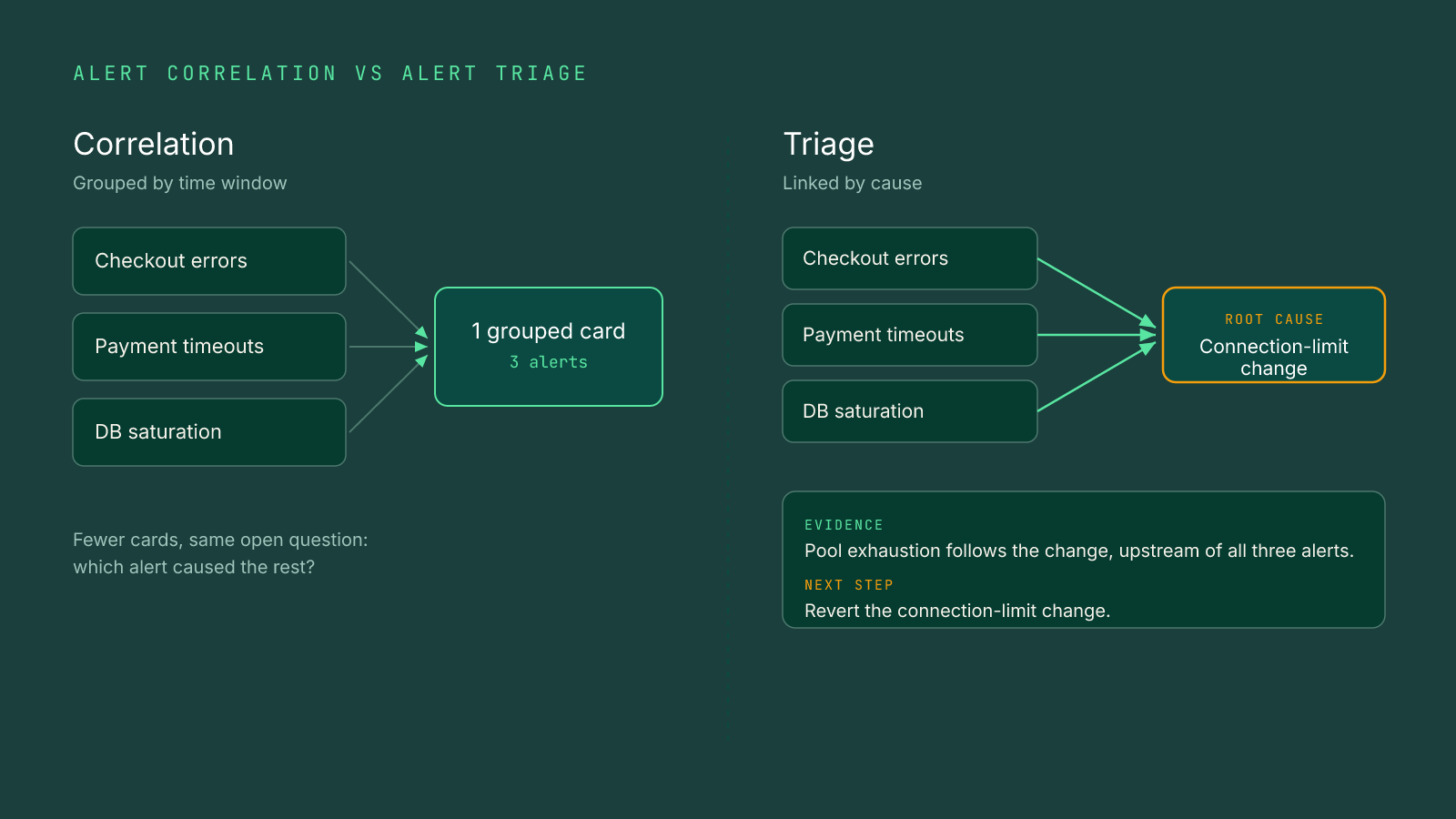
Deduplication and correlation reduce how many cards a responder sees, not how much is left to explain. The usual result is a tidier view of the same noise.
Environments change faster than thresholds and rules can be maintained, so static tuning keeps falling behind. Alert hygiene still matters: delete alerts nobody can act on. Triage tools complement that cleanup rather than replace it.
Missed signals turn into expensive outages
A buried early warning can grow into a costly outage. In the Uptime Institute 2026 outage analysis, 57% of respondents to Uptime's 2025 survey said their most recent major outage cost more than $100,000.
Uptime also reported declining outages per site, so the exposure sits in each signal that slips through. For leaders, the triage layer protects both mean time to recovery (MTTR) and the on-call team's attention.
What to look for in alert triage software
Look for software that investigates every alert, explains its conclusion with evidence, and keeps its context current, rather than only reducing the count.
1. Investigation, not just correlation
Strong tools test whether one alert caused another instead of assuming co-firing alerts share a cause.
- Hypothesis testing: Each hypothesis is checked against telemetry and changes.
- Multi-hop depth: Reasoning crosses services, infrastructure, and network layers.
- Cause versus symptom: The originating failure is separated from downstream noise.
Why it matters: Starting from the symptom costs the minutes that decide recovery time.
2. Coverage of the full alert stream
The tool should evaluate every alert, so early warnings in noisy channels still get read.
- No sampling: Quiet and noisy channels get equal scrutiny.
- Behavioral baselines: Historical behavior defines normal for each signal.
- Novelty detection: Unfamiliar patterns surface without a matching rule.
Why it matters: The alert that predicts an outage often fires where nobody watches.
3. Context that maintains itself
The best tools learn from runbooks, docs, and past incidents without endless hand-maintained prompts.
- Automatic learning: Each investigation adds context without a documentation project.
- Light human input: Engineers refine context rather than author it.
- Configuration contrast: Be wary of depth that hinges on configured patterns or connected runbooks.
Why it matters: Context that depends on manual upkeep decays as the environment changes.
4. Evidence a responder can review
The output should show its work rather than an opaque confidence score.
- Scope and signals: Affected services and supporting telemetry accompany the conclusion.
- Remediation path: A recommended next step accompanies each escalation.
- Escalation rationale: Every evaluated alert records why it was or wasn't escalated.
Why it matters: Reviewers can only trust suppression they are able to audit.
5. A delivery model and deployment that fit the enterprise
The right tool reaches responders where they work and runs where your data must stay. Delivery spans three phases of autonomy: invoked, background, and proactive.
- Invoked: Someone opens a tool and asks a question.
- Background: Scheduled or rule-triggered runs need no prompt.
- Proactive: The agent decides when to engage and when to stay quiet. Traversal Workers are this proactive form factor, living in the alert channel.
- Deployment options: Regulated data calls for on-premises or BYOC, with read-only access as a common vendor baseline.
Why it matters: A proactive agent removes the step where someone must remember to check.
What is the difference between alert correlation and alert triage?
Alert correlation groups alerts that fired together or look alike. Alert triage decides which of those alerts matter, what caused them, and what to do next.
Shared timing is not shared cause, because unrelated alerts often fire together. Routing and correlation govern delivery, which is why alert routing can't find root cause on its own.
In the February 2026 Adobe agentic alert triage study, an arXiv preprint, researchers reported a 90% reduction in mean time to insight versus manual triage. The figure covered 250 alert events over 12 weeks on one in-house system, and it measured time to a diagnostic summary, not recovery.
Traversal's causal pipeline runs in sequence:
- Agentless Data Capture™: Reads telemetry, code, and change data without agents.
- Causal Indexer™: Distills production data while keeping causal signal.
- Production World Model™: Maintains a live model of dependencies and baselines.
- Knowledge Bank™: Holds operational context Traversal mostly auto-discovers after each investigation, with human input as last-mile refinement.
- Causal Search Engine™: Tests hypotheses in parallel across multi-hop dependencies and returns one evidence-backed root cause with a remediation path.
Traversal Workers deliver the result in the channel: Alert Workers in alert channels, Incident Workers in incident channels.
Choosing the right alert triage tool for your team
The best alert triage tool removes your team's actual bottleneck, whether that sits before the page, during investigation, or between alert and incident.
- Locate the bottleneck, then match the design. Find where engineer hours go.
- Before the page: PagerDuty brings paging maturity, and BigPanda brings ITOps correlation into ServiceNow.
- Between alert and incident: Rootly or incident.io pair chat-based on-call with AI investigation.
- During investigation at enterprise scale: Traversal reasons causally across the whole stream.
- Test against a live alert stream. Demo datasets hide your real noise.
- Real channels: Connect your noisiest alert sources first.
- Real failures: Replay recent incidents against your postmortems.
- Measure outcomes, not counts. Raw alert reduction says little.
- Actionable rate: Track the share of pages that needed a human.
- Recovery time: Compare mean time to recovery before and after rollout.
Traversal fits enterprises where alert volume and dependency depth have outgrown both humans and rules, and the bottleneck is explaining alerts.
Your own alert stream is the honest test. Book a demo to watch Traversal's Alert Workers evaluate every alert and explain each escalation decision with its reasoning.
FAQ
Pick a tool that reasons across pods, deployments, services, and the infrastructure underneath them, because Kubernetes symptoms often start somewhere else in the stack.
A SIEM collects and correlates security events for threat detection. An alert triage platform for reliability evaluates operational alerts to protect availability and recovery time.
Yes. A paging tool can keep handling schedules and escalation while AI triage sits in front of it and decides what deserves a page.
Track pages per on-call shift alongside the actionable share of pages and recovery time for real incidents. Fewer alerts alone is not success.
It can if it only suppresses. Choose a tool that shows why every alert was or wasn't escalated, so reviewers can audit its decisions.