The 5 Best Escalation Management Tools in 2026

The best escalation management tools in 2026 are Traversal, PagerDuty, ServiceNow IT Service Management, incident.io, and Rootly. Escalation management software decides who gets notified when the current responder needs more expertise or authority, then tracks the handoff and keeps the response coordinated. The ranking covers production and IT incidents in large enterprises, not customer-support ticket desks.
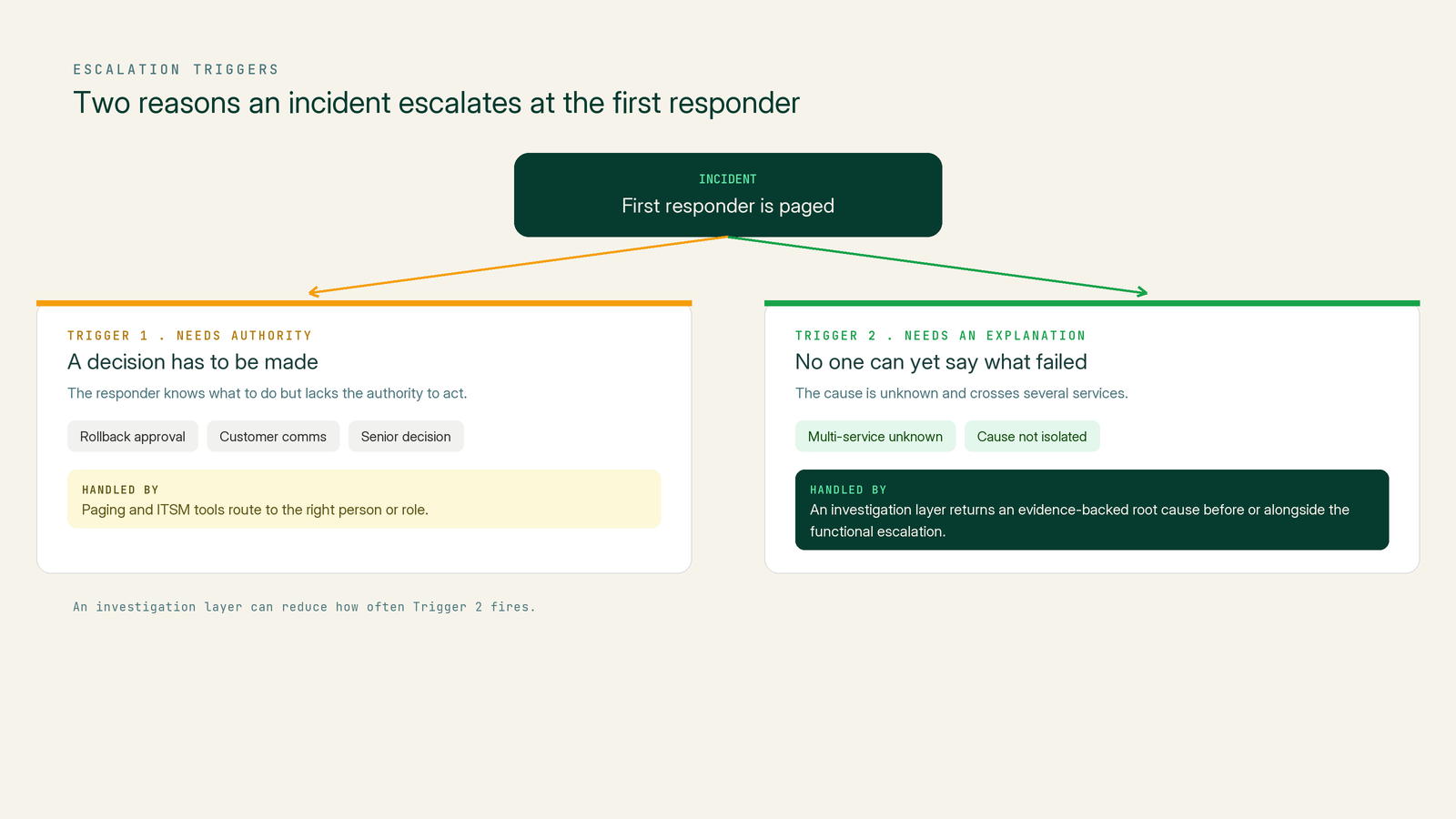
Routing tools are good at getting a page to the right team. Some escalations fire because the responder needs a decision from someone with more authority. Others fire because nobody on the call can yet explain what failed, so the next responder starts the investigation over.
A strong escalation stack handles both the routing and the explanation. AI investigation is also changing what triggers an issue escalation. A first responder who can see the cause has fewer reasons to hand the incident to someone else.
Book a demo to watch Traversal Workers investigate a multi-service incident in Slack or Microsoft Teams and post an evidence-backed root cause.
The Top 5 Escalation Management Tools in 2026
The ranking weighs four criteria: reaching the right responder, coordinating the response, diagnostic depth at escalation time, and enterprise fit.
1. Traversal
Traversal is the frontier lab behind the AI SRE platform built for the enterprise.
Its architecture turns production data and operational knowledge into continuously updated causal context. Agentless Data Capture™ collects telemetry, code, and production data, and the Causal Indexer™ distills it. The Production World Model™ keeps a causal model of the environment current.
The Knowledge Bank™ automatically learns from past incidents, and offers the option for users to manually add runbooks, documentation, and past incidents. The Causal Search Engine™ then tests hypotheses across multi-hop dependencies, where the cause sits several services or infrastructure layers away from the symptom. The pipeline powers evidence-backed Incident RCA, a root cause with supporting evidence that responders and escalation targets can review.
Responders see those findings through Traversal Workers in incident channels where you already work, such as Slack and Microsoft Teams. Workers investigate, stream their reasoning in threads, tag the right people, and leave a draft postmortem when the incident closes. Incident Workers became generally available as the default incident experience on September 2, 2026.
PepsiCo uses Traversal to triage an alert stream of 500,000+ alerts per month. PepsiCo's alert triage results also include clearing a backlog of 700+ high-severity alerts and a 70% cut in investigation time.
The Fortune 100 financial services results show 82% root cause analysis accuracy across in-scope applications. That company also saw a 32% reduction in potential MTTR within those applications.
Best for: Enterprise SRE and platform teams whose escalations stem from multi-service unknowns and high alert volume, including regulated industries.
Strengths:
- Multi-hop causal investigation: The Causal Search Engine™ tests causes across services, changes, and infrastructure.
- Proactive Workers: Incident Workers join new incident channels in Slack and Teams without prompting.
- Alert triage: Alert Intelligence triages and deduplicates alerts, so fewer noisy alerts reach on-call responders.
- ServiceNow writeback: Traversal writes its findings into ServiceNow.
- Deployment options: Capture is agentless and read-only, with on-premises or BYOC deployment.
Potential limitations:
- No paging: Traversal does not manage on-call schedules or escalation policies; its main value proposition is that it is an AI SRE platform that focuses on incident root cause and remediation.
- Built for scale: A team running a handful of services may not need multi-hop causal search.
2. PagerDuty
PagerDuty is an on-call and incident management platform built around escalation policies. Each rule notifies a person or schedule, and if nobody acknowledges before the timeout, the incident moves to the next rule.
Best for: Large organizations with complex service ownership that need mature, policy-driven paging.
Strengths:
- Configurable timeouts: The escalation timeout defaults to 30 minutes and can be adjusted.
- Policy depth: A policy can hold up to 20 rules and repeat up to nine times.
- Round robin: Round robin scheduling spreads incidents across responders on eligible plans.
- Dynamic routing: Event Orchestration can override the escalation policy assigned to a service.
- SRE Agent: Paige, PagerDuty's SRE Agent, can investigate in parallel with on-call responders.
Potential limitations:
- Free plan cap: The Free plan is limited to a single escalation policy.
- AI add-ons: Paige requires AIOps and PagerDuty AI; on Enterprise, Business, and Professional plans, PagerDuty AI comes through one-time AI Actions or an add-on.
- Early Access: Adding the SRE Agent directly to escalation policies was Early Access as of August 2026.
3. ServiceNow IT Service Management
ServiceNow IT Service Management (ITSM) covers the ticket-based end of escalation for IT operations. On-Call Scheduling sets rosters, escalation policies, and trigger rules, and On-Call Escalation Tracking shows each escalation's timeline.
Major Incident Management flags major-incident candidates through trigger rules or manual proposal, with communication plans that vary by priority. Service Level Management sets SLA targets on each task.
Best for: Enterprises that run IT operations through ITIL processes and need escalation, SLAs, and audit history on the same record.
Strengths:
- One system of record: Escalation, SLA, and major incident records live on one platform.
- Parent-child handling: Child incidents close when their parent major incident closes.
- AI Agents: AI Agents surface catalog items, knowledge articles, and past incidents to recommend resolution steps.
Potential limitations:
- Tier gating: On-Call and Major Incident Management sit in ITSM Advanced, and AI Agents for ITSM sit in ITSM Prime.
- Admin setup: Escalation runs only after admins define trigger rules and escalation policies.
- Record-based AI: AI recommendations draw on existing records, so their quality depends on the knowledge base and incident history.
4. incident.io
incident.io is a Slack- and Microsoft Teams-native platform for on-call, incident response, and AI investigations. Escalation paths define notification levels, wait times, retries, and round robin rotation.
Best for: Engineering-led organizations that run incidents in chat and want hard and soft escalation from Slack.
Strengths:
- Smart escalation paths: Priority and working-hours rules decide who is paged and when.
- Hard and soft escalation: Responders can page someone directly from Slack or notify them without a page.
- Investigations: Investigations draw on past incidents, documentation, code, telemetry, and change events.
Potential limitations:
- Wiring required: Escalation paths fire only when connected to an alert route, a workflow step, or a manual escalation.
- Add-ons and caps: Root cause analysis is an add-on, and automatic investigations have hourly, daily, and weekly limits.
- Slack-first context: Connecting channels as an investigation source is available for Slack only.
5. Rootly
Rootly is an on-call and incident management platform with paging in Slack and Teams and a built-in AI SRE. Escalation policies support 1 to 9 repeat cycles and several paging strategies, including two forms of round robin. A default path acts as a fallback when no other path matches.
Best for: SRE teams that want on-call, chat-based incident response, and AI investigation from one vendor.
Strengths:
- Flexible paths: Escalation paths can match alert urgency and time restrictions.
- Parallel escalation: A step can trigger another team's policy while the original keeps running.
- AI SRE: Rootly AI SRE analyzes code changes, telemetry, and past incidents to identify root causes.
- Agent testing: Rootly acquired ThinkHive on July 28, 2026, to test its AI agents' reliability.
Potential limitations:
- Separate pricing: Incident Response and On-Call are priced separately, and the AI SRE requires Incident Response.
- Policy bypass: A page targeted at a specific user skips the escalation policy entirely.
- Skipped channels: Slack and Teams channel targets can be skipped under round robin and random strategies.
What Is Escalation Management Software?
Escalation management software brings in additional expertise or authority when the current responder cannot restore service alone. It then records who was notified, who acknowledged, and how the handoff progressed.
The ITIL glossary of escalation types, from the 2011 edition, names two: functional escalation and hierarchic escalation. ITIL defines functional escalation as transferring an incident, problem, or change to a technical team with a higher level of expertise. Hierarchic (or hierarchical) escalation, in ITIL's terms, means informing or involving more senior levels of management.
Escalation levels, such as Tier 1 to Tier 3 (or L1 to L3), set the order in which teams are engaged. An escalation matrix maps those levels to people, order, and severity or service conditions. It also states what happens when nobody acknowledges.
Ticket-based escalation runs SLA timers on a service record, as ServiceNow does. Incident-based escalation runs acknowledgment timeouts on on-call schedules, as PagerDuty, incident.io, and Rootly do.
Some escalations request authority, such as approval for a rollback or a decision on customer communication, and routing tools handle these well. Others request an explanation because nobody can yet say what failed, and investigation tools can reduce how often those fire.
Why Enterprises Are Re-Evaluating Escalation Tooling
Three pressures are pushing enterprises to review escalation tooling.
Downtime Cost Rewards Shorter Escalation Chains
Each handoff that restarts the investigation lengthens an outage. In Uptime Institute's 2026 outage analysis, 57% of surveyed data center and IT operators said their most recent major outage cost over $100,000. About one in five put that outage above $1 million.
In the 2024 edition of ITIC's hourly downtime cost survey, over 90% of mid-size and large enterprises estimated one hour of downtime above $300,000. Forty-one percent estimated $1 million to over $5 million per hour, in self-reported figures that exclude legal fees and penalties.
On-Call Load Has a Ceiling
Google's SRE Workbook (2018) sets Google's on-call load target at a maximum of two incidents per 12-hour shift, to leave time for follow-up. An incident means one underlying problem, however many alerts fire.
When every unexplained incident pulls in a secondary responder and then a specialist, the extra load lands on the engineers with the most context. A longer paging ladder only adds recipients, and recipients who cannot act on the problem add noise without an explanation.
Platform Changes Are Forcing Migrations
Atlassian ended Opsgenie sales on June 4, 2025, and support ends on April 5, 2027. Atlassian directs Opsgenie customers to Jira Service Management.
A migration is a natural point to decide whether to add an investigation layer. Traversal's view of how AI changes the escalation model is that cross-boundary diagnosis at the first responder shifts more escalations toward requests for authority.
How to Evaluate Escalation Management Tools
Test each candidate against incidents your teams have already handled, then compare its output with what actually happened.
- Routing and policy control. Check timeouts, repeats, round robin, priority and working-hours branches, parallel cross-team escalation, and override rules. Confirm your plan tier includes them.
- Signal quality before the page. Look for grouping, deduplication, and triage that records why each alert was or was not escalated. Alert Intelligence triage deduplicates alerts and prioritizes them by business impact, so fewer alerts reach on-call responders.
- Coordination and record-keeping. Compare chat-native response, ITSM records, SLA tracking, and audit timelines. Ticket-based teams should prioritize the system of record.
- Diagnostic depth at escalation time. Ask whether the tool can test causes across services, changes, and infrastructure, and hand the next responder verified evidence. Microsoft's study of production incidents found 90.7% of monitor-detected incidents reached the correct team on the first attempt. The study, covering Microsoft's generative AI cloud services, notes one symptom can have several root causes. Routing accuracy alone does not shorten the investigation.
- Deployment and control. Ask where data stays, such as on-premises or BYOC. Ask whether access is read-only and which actions need human approval.
How Do You Measure Escalation Performance?
Measure escalation performance with five metrics read together: escalation rate, reassignments, pages per shift, engineers per major incident, and MTTR.
- Escalation rate and reason: Track escalations per incident, and tag each one in the postmortem as a request for authority or for an explanation.
- Reassignments per incident: Count each change of owning team, the "transfer hops" in the Microsoft study, alongside time to engage the correct team.
- Pages per on-call shift: Compare the count against a budget your team sets, using Google's two-incident target as a reference.
- Engineers per major incident: Count how many people join each major incident.
- MTTR for multi-team incidents: Compare MTTR for incidents that crossed team boundaries before and after a tool change.
If explanation-driven escalations fall while authority-driven ones hold steady, that is a sign the investigation layer is working.
Choosing the Right Escalation Management Tool for Your Team
Match the tool to the bottleneck in your incident history:
- Reaching the right responder: Choose PagerDuty, incident.io, or Rootly when reaching and coordinating on-call engineers is the problem.
- Escalating on a record: Choose ServiceNow ITSM when escalation must live on an ITIL record with SLAs.
- Explaining the failure: Choose Traversal when escalations stall because no one can yet explain a multi-service failure.
Traversal is designed to run alongside a paging or ITSM tool. Schedules, policies, and approvals stay where they are, while Traversal investigates in Slack and Teams and writes findings into ServiceNow.
A verified root cause often still needs a specialist to apply the change or a manager to approve it. Those people start from evidence instead of an alert title. Traversal's guide to systems for managing escalations efficiently compares routing and investigation in more depth.
Book a demo to run Traversal against recent multi-team incidents from your environment and review the evidence behind each root cause.
FAQ
Helpdesks such as Zendesk handle customer support ticket escalations, which differ from production incident escalations across engineering teams. This list focuses on incident escalation tools.
An escalation matrix maps who gets notified at each escalation level and under which conditions. It also specifies how long each level has to respond before the next one is engaged.
In ITIL's terms, functional escalation transfers an incident, problem, or change to a technical team with more expertise. Hierarchical escalation informs or involves more senior levels of management.
Yes. Teams can keep PagerDuty or an ITSM tool for schedules, escalation policies, and records, while Traversal investigates incidents in Slack or Microsoft Teams and writes findings into ServiceNow.
Atlassian directs Opsgenie customers to Jira Service Management. Teams preferring another paging tool can evaluate PagerDuty, incident.io, or Rootly, and may also consider whether they need an investigation layer.




What Are the Best AI SRE Tools for Financial Services? 5 Platforms Ranked for 2026

Traversal Now Sees Your AWS Stack: Introducing CloudWatch and AWS Account Integrations