Managing Production incidents in Slack: Coordination is Not Diagnosis

In DigitalOcean's incident response story, an incident Slack channel opened and Traversal joined it immediately. Traversal identified the root cause 11 minutes after the channel opened: a recent change in a deeply nested service. The team rolled back the PR.
Managing production incidents in Slack comes down to two jobs that people tend to blur together: coordinating the room and diagnosing the failure. Slack is built for the first job. The incident clock mostly runs on the second.
The sections below cover how to set up and run the channel well, and why even a tidy channel still waits on the root cause.
What is managing production incidents in Slack?
Managing production incidents in Slack means running incident response inside Slack. Each incident gets its own channel, with named roles, a steady cadence of updates, and a channel history that becomes the record for the postmortem.
The channel is the command post, and its boundaries are worth stating early. Paging and alert routing run in other systems. The investigation itself happens across dashboards, logs, code, deploy history, and the heads of a few senior engineers.
Google's SRE guidance on managing incidents separates command, operations, communication, and planning roles and calls for a recognized place to reach the incident commander. Google wrote about war rooms, email, and IRC rather than Slack. Treating the Slack channel as that command post, where those roles meet, is our interpretation of the model.
Why does the incident channel matter?
The incident channel matters because it decides how soon the right people find each other and agree on the state of the incident. Outages are expensive, so every minute of confusion has a price.
- Outage cost: Uptime Institute's 2026 outage analysis reported that 57% of its 2025 survey respondents said their most recent major outage cost more than $100,000.
- One command post: A single channel keeps responders from splintering across side channels and DMs. Everyone works from the same thread of decisions.
- A shared state: A pinned summary of the current state lets late joiners catch up without scrolling through hundreds of messages.
- A record: Channel history becomes postmortem input, as long as decisions are written down in the channel as they happen.
- Engineering hours: Every responder pulled into the war room stops other work. A crowded channel costs a reliability leader time even before recovery starts.
Uptime's annual analysis covered IT and data center outages. For leaders, the channel shapes both the outage bill and the engineering hours spent on it.
How do you manage a production incident in Slack?
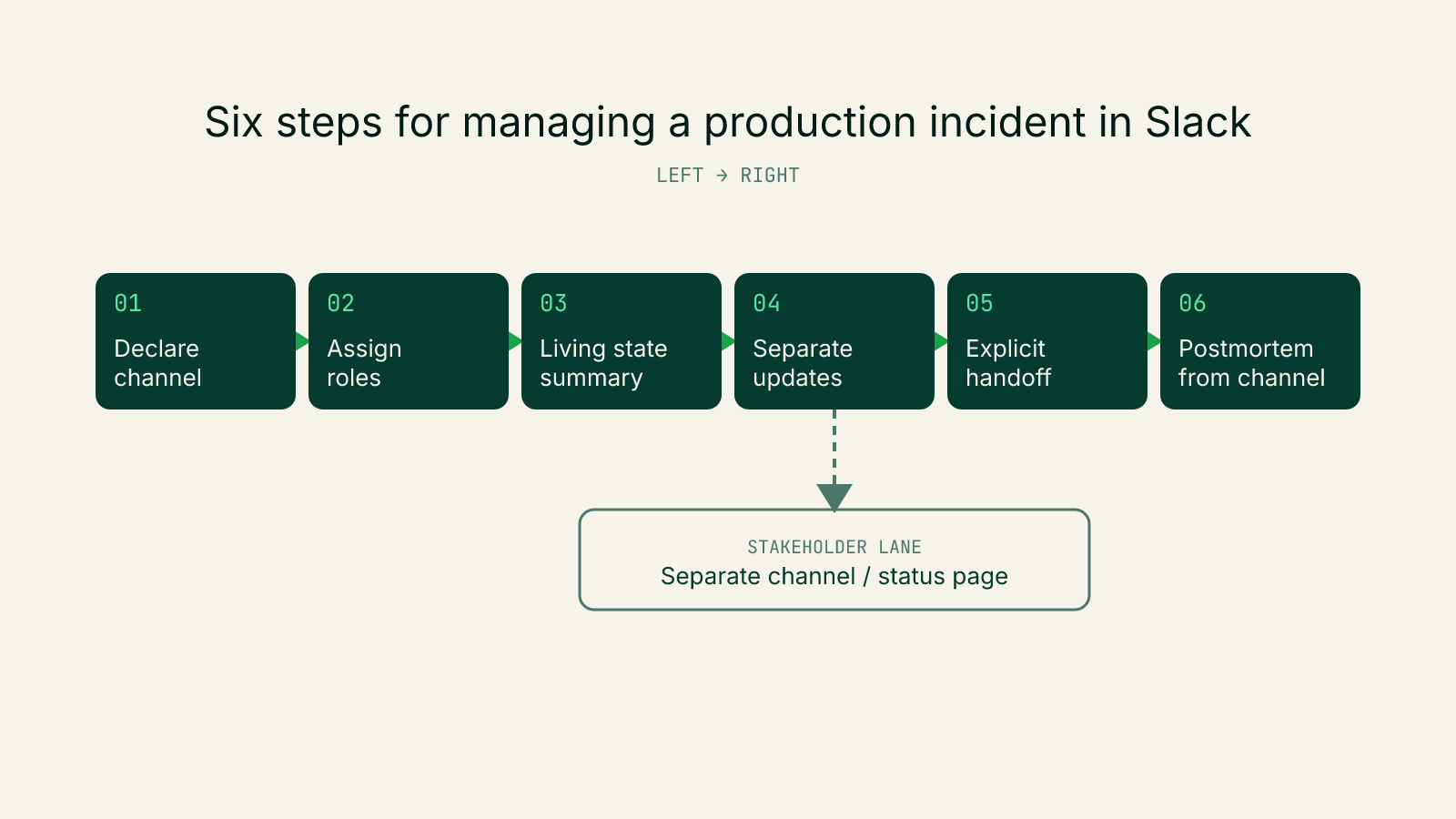
Run it as six steps. Open one channel, assign roles, and keep a living state summary. Then separate the work from stakeholder updates, hand off explicitly, and close with a postmortem built from the channel.
- Declare and open one channel per incident.
- Naming: Use a convention such as
inc-<id>-<service>. Put severity and the current owner in the channel topic. - Entry point: Open the channel from the alert channel, so the alert links straight to the incident channel.
- Pinned context: Pin the runbook and the dashboards for the affected service before the first theory lands.
- Preparation: Build channel templates and a stakeholder map before anything breaks.
- Naming: Use a convention such as
- Assign roles in the first message.
- Core roles: Name an incident commander, an operations lead, and a communications lead. Add a scribe on larger incidents.
- Change control: Only the operations lead changes production. This follows Google's split between command and operations.
- Keep one living state summary.
- Contents: Pin a short summary covering impact, what has been ruled out, the current lead, and the next action with its owner.
- Edit in place: Update the pinned message instead of reposting it. This mirrors Google's living incident document and spares late joiners the scrollback.
- Separate investigation from stakeholder updates.
- Two audiences: Keep the working channel for responders. Send everyone else to a stakeholder channel or a status page.
- Cadence: Set an update interval by severity and keep posting on schedule when there is no news. We recommend tighter intervals for higher severities.
- Threads: Move side investigations into threads, so the main channel stays readable.
- Hand off command explicitly.
- Announcement: State the handoff in the channel and update the pinned summary.
- Acknowledgment: Have the incoming commander confirm in the channel before the outgoing commander steps away.
- Close with a postmortem built from the channel.
- Final status: Post the impact window and the fix that ended it.
- Timeline: Draft it from channel history and the pinned summary. Copy any decisions made on calls or in DMs into the channel first.
- Follow-ups: Turn each one into a ticket before archiving, so none of them die in Slack.
Why does a well-run Slack channel still leave incidents open?
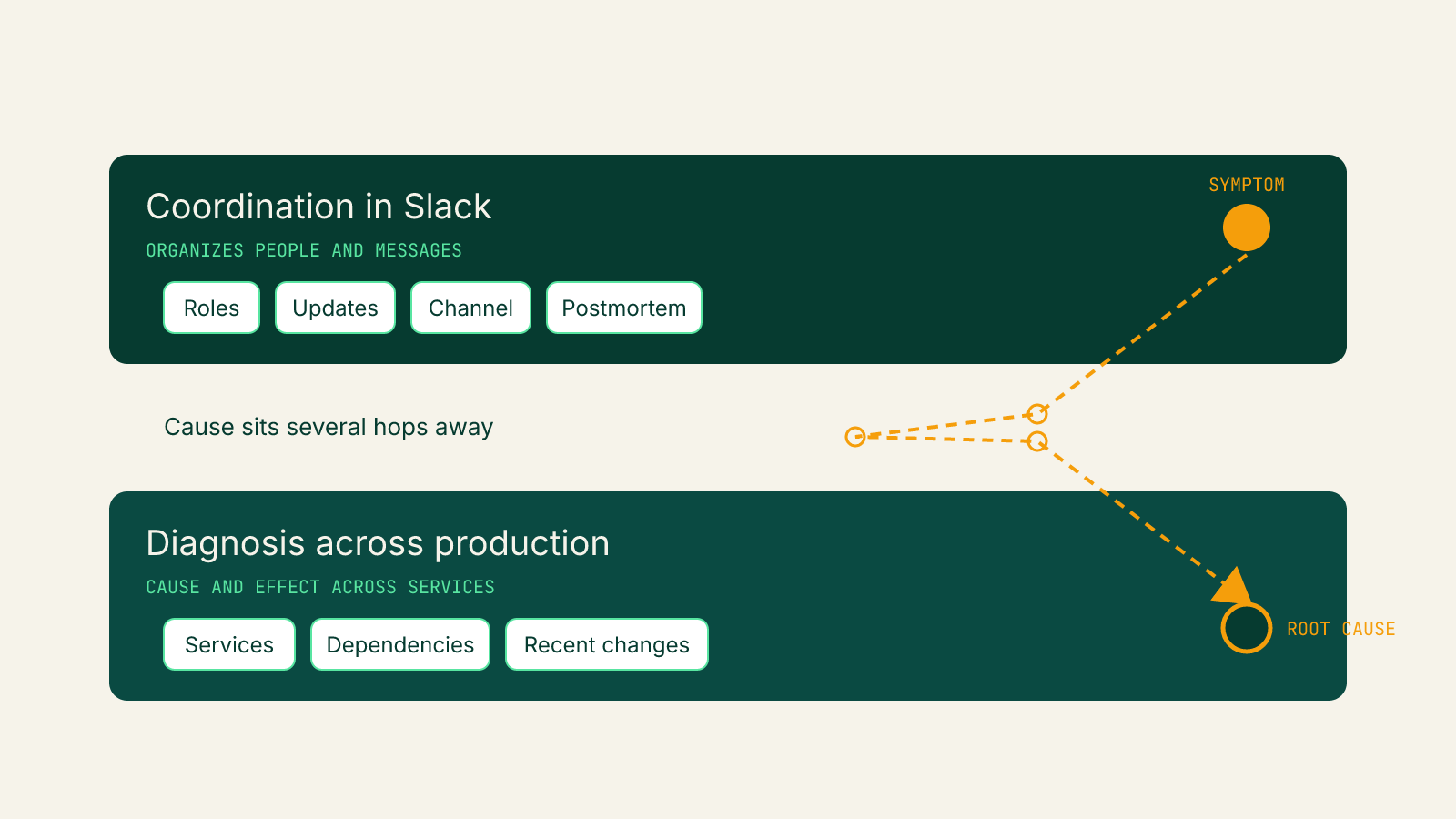
In Traversal's view, channels stay open because those steps organize people and messages, while the longest stretch of most incidents is working out what broke. Slack was designed to carry conversation. It was not designed to test a hypothesis against production.
Observability dashboards exist to show what moved, and the channel collects theories about why. Neither one connects a symptom to the change several services away that caused it. Traversal's breakdown of where incident time goes argues that diagnosis is the slow part, and the fix usually follows soon after the cause is known.
A perfectly run channel can still be waiting on the one fact that matters.
Researchers at Microsoft described the same problem from inside their own cloud in 2025. The authors of Microsoft research on root cause analysis described root cause analysis as time-consuming, requiring deep domain knowledge and back-and-forth among on-call engineers. They stated that identifying the root cause early can significantly reduce time-to-mitigate.
A Microsoft incident study of generative AI cloud services, also from 2025, found the same symptom arising from multiple root causes. The authors concluded that diagnosing the root cause from symptoms "is not straightforward." Both papers speak to Microsoft's environment, and both point at diagnosis as the hard part.
That undercuts a common belief: fix the Slack workflow and mean time to recovery (MTTR) drops. Adding responders adds theories, and theories are not evidence. The table shows where each job gets its support.
JobWhat it needsWhat Slack providesCoordinationPeople, roles, one shared stateChannels, mentions, pins, workflowsCommunicationStakeholder audiences, a steady cadenceSeparate channels, threads, scheduled messagesDiagnosisDependency-aware evidence, change history, hypothesis testingA place to discuss theories
How does Traversal approach managing production incidents in Slack?
Traversal joins the incident channel as an AI SRE. It runs the investigation across production and posts a single, evidence-backed root cause with a remediation path. The team decides what to do.
That puts diagnosis in the same room as coordination. Responders keep running the six steps, and the evidence they were waiting on arrives in the channel early.
Traversal for Slack
Traversal for Slack starts or joins the incident channel the moment something breaks, or investigates when someone @mentions it. Findings land in the thread as they are ready. Responders ask follow-up questions by tagging @Traversal in that same thread, and it can pull context from any channel it has been added to.
Traversal Incident Workers
Traversal Incident Workers are proactive AI SREs that join incident channels automatically.
- Judgment about when to speak: Each Worker decides when to engage and when to stay quiet. It errs toward silence to avoid adding noise.
- Live scratchpad: The Worker keeps a running scratchpad that gets anyone joining midway up to date.
- Draft postmortem: When the incident closes, the scratchpad becomes a draft postmortem with a summary, timeline, root cause, and suggested alerts.
- Clear boundaries: Workers never touch alerting, paging, or routing on their own. Each arrival message includes a one-click remove button.
- Two chat surfaces: Workers run in Slack and Microsoft Teams, and responders can also chat with a Worker privately.
FAQ
It means running incident response in a dedicated Slack channel with named roles, regular updates, and a channel history that can support the postmortem. Slack serves as the command post, while investigation also uses dashboards, logs, code, deploy history, and engineers’ knowledge.
Open one channel per incident, assign an incident commander, operations lead, and communications lead, and keep a pinned summary of impact, findings, the current lead, and next actions. Separate responder work from stakeholder updates, announce command handoffs, and use the channel history to prepare the postmortem and track follow-up tickets.
Slack helps coordinate people and messages, but it does not test hypotheses against production or connect symptoms to the change that caused them. Diagnosis is often the slow part of an incident, and identifying the root cause early can reduce time to mitigate.
It should briefly cover the incident’s impact, what has been ruled out, the current lead, and the next action and its owner. Update the pinned message in place so late joiners can quickly understand the current state.
Traversal joins or starts an incident channel and investigates across production, posting an evidence-backed root cause and remediation path. Responders can ask follow-up questions in the same thread, while the team decides what action to take.

The Best Production Debugging Tools in 2026: 5 Platforms that Find the Root Cause