The Best Production Debugging Tools in 2026: 5 Platforms that Find the Root Cause

Production debugging tools help engineers work out why a live service is breaking, using its observability data. In rank order, the best production debugging tools are Traversal, Sentry, Datadog, Lightrun, and Honeycomb.
Distributed estates split symptom from cause: the error surfaces in one service while the change behind it sits several dependencies away. Many debugging tools collect evidence about the error, and fewer explain which change produced it.
Traversal named the root cause of a DigitalOcean incident 11 minutes after the incident channel opened: a recent change in a deeply nested, non-obvious service. DigitalOcean also cut MTTR (mean time to recovery) by 38%, as described in DigitalOcean's results with Traversal.
When incidents cross services and owners, explanation is where recovery time goes. Book a demo to see Traversal pinpoint the root cause of a production incident.
What are the best production debugging tools?
Ranked by how directly they take you from a live symptom to the change that caused it, the best production debugging tools are Traversal, Sentry, Datadog, Lightrun, and Honeycomb.
1. Traversal
Traversal is an AI SRE for the enterprise that investigates incidents across services, infrastructure, code, and changes.
Its differentiator is multi-hop causal reasoning that returns one evidence-backed root cause and a remediation path, the core of Traversal's Incident RCA capability.
Enterprises with large distributed estates gravitate to it, and DigitalOcean runs it on-premises with read-only access.
Best for: Enterprise reliability teams whose incidents cross many services and owners.
Strengths:
- Multi-hop investigation: Follows causal paths across apps, services, infrastructure, and networking.
- One causally consistent diagnosis: Returns a single root cause with an evidence chain engineers can check.
- Agentless, read-only capture: Works from the telemetry, code, and change history you already collect.
- Delivery in existing workflows: Incident Workers join Slack and Microsoft Teams incident channels; Traversal MCP works in Claude Code, Cursor, and other MCP-compatible interfaces.
- Flexible deployment: Runs on-premises or BYOC, with bring-your-own-model (BYOM) support.
Potential limitations:
- Built for scale: A small team running a handful of services may not need multi-hop causal search.
- Existing signals only: Traversal reasons over telemetry, code, and changes you collect, so line-level variable capture at a breakpoint stays with a live debugger.
2. Sentry
Sentry is an application monitoring platform that captures errors, logs, request-path data, session replays, and profiles.
Seer, its AI debugging agent, sets it apart: Autofix runs root cause analysis, then opens a fix PR or briefs a coding agent.
Application teams chasing code-level bugs tend to start here.
Best for: Product engineering teams on GitHub.com or GitLab.com who want error-to-PR workflows.
Strengths:
- Session Replay: Shows video-like reproductions of user sessions on web and mobile.
- Cross-service root cause analysis: Seer reads end-to-end request data to find causes that cross service boundaries.
- Fix PRs or agent handoff: Autofix opens a PR or passes the plan to Claude Code, Cursor Cloud Agents, or GitHub Copilot.
- Seer Agent: Finds telemetry or creates dashboards and alerts from natural-language requests (open beta).
Potential limitations:
- Cloud source control only: Seer supports the GitHub.com and GitLab.com cloud versions and isn't available on self-hosted Sentry.
- Instrumentation-dependent answers: Sentry warns of weaker answers when a project reports only exceptions, without spans, logs, or code mappings.
3. Datadog
Datadog is a SaaS observability and security platform spanning APM, logs, infrastructure monitoring, and error tracking.
Breadth sets it apart: APM, live debugging, and AI investigation through Bits Investigation (launched as Bits AI SRE) and Bits Code sit in one platform.
Organizations standardized on Datadog get the most from it.
Best for: Teams that want APM, live debugging, and AI investigation inside one SaaS platform.
Strengths:
- Live Debugger: Built on Datadog's Dynamic Instrumentation, it adds auto-expiring, non-breaking logpoints to running services without a redeploy.
- Exception Replay: Error Tracking captures production variable values for errors tied to APM data.
- Bits Investigation: Datadog describes it as an autonomous agent that investigates production issues end to end.
- Bits Code: Proposes code fixes from Datadog observability data and never auto-merges PRs.
Potential limitations:
- SaaS-only delivery: Datadog runs as SaaS on independent regional sites, so telemetry stays in Datadog's cloud.
- Instrumentation scope: Datadog documents that Dynamic Instrumentation, which Live Debugger builds on, isn't compatible with serverless environments or Azure App Services.
4. Lightrun
Lightrun describes itself as an AI SRE platform built on runtime context, adding dynamic logs, snapshots, and metrics to running code without redeploys.
What sets it apart is generating new runtime evidence on demand inside a read-only sandbox, from the IDE or through Lightrun MCP.
Teams whose bugs appear only in production reach for it first.
Best for: Java, .NET, Python, and Node.js shops that need line-level runtime evidence, including in regulated environments.
Strengths:
- Dynamic logs and snapshots: Snapshots act as virtual breakpoints that don't pause the application.
- IDE and MCP access: Works in IntelliJ IDEA, VS Code, and Visual Studio, and in Cursor, GitHub Copilot, and Claude Code.
- PII redaction: Redacts personal data in snapshots, dynamic logs, and MCP results.
- Deployment range: Offers SaaS, private cloud, and fully air-gapped on-premises options.
Potential limitations:
- Runtime coverage: Agents cover the JVM, Python, Node.js, and .NET, and Lightrun lists no Go, Ruby, or PHP agents.
- Location-by-location evidence: Evidence is captured at the code locations an engineer or agent chooses, so cross-service investigation starts with picking where to look.
5. Honeycomb
Honeycomb is an observability platform built on a columnar event store, where teams group and filter on any attribute at any cardinality.
BubbleUp is the standout, highlighting the users, builds, regions, or services that differ most in an outlier set.
Engineers who debug by slicing raw events gravitate to it.
Best for: Teams instrumented with OpenTelemetry who investigate high-cardinality data.
Strengths:
- High-cardinality querying: Honeycomb reports sub-second queries on high-cardinality data, with no pre-aggregation.
- Canvas: Investigates alerts, anomalies, and SLO burns in an AI-powered workspace.
- Hosted MCP server: Lets agents query and analyze Honeycomb data, including SLOs and triggers.
Potential limitations:
- Bounded by instrumentation: Honeycomb's analysis works on the telemetry teams send, so data that was never emitted has to be instrumented first.
- Investigation-only Canvas: Canvas is built for investigation and can't modify configuration or infrastructure.
Quick comparison of the top production debugging tools
The real split is whether a tool gathers evidence (errors, snapshots, queries) or explains which change caused a failure across services.
RankPlatformBest forCore strengthPotential limitationDelivery model1TraversalMulti-hop incidents across ownersOne evidence-backed root cause plus remediation pathMore depth than small estates need; no breakpoint captureWorkers in Slack and Teams, plus MCP; on-premises or BYOC2SentryApp teams fixing code defectsError-to-PR flow through SeerSeer absent from self-hosted SentrySaaS UI plus coding-agent handoff3DatadogDatadog-standardized organizationsAPM, live debugging, and AI in one placeSaaS-onlySaaS platform with built-in AI agents4LightrunProduction-only bugs in supported runtimesOn-demand runtime evidenceNo Go, Ruby, or PHP agentsIDE plugins and MCP; SaaS or air-gapped5HoneycombHigh-cardinality explorationBubbleUp outlier comparisonWorks on telemetry you sendSaaS query UI plus Canvas and MCP
What is production debugging software?
Production debugging software helps engineers find why a live system misbehaves, using evidence collected from the running environment rather than a local reproduction. The Google SRE Book troubleshooting chapter notes that reproducing a problem in a live production system "may not be an option."
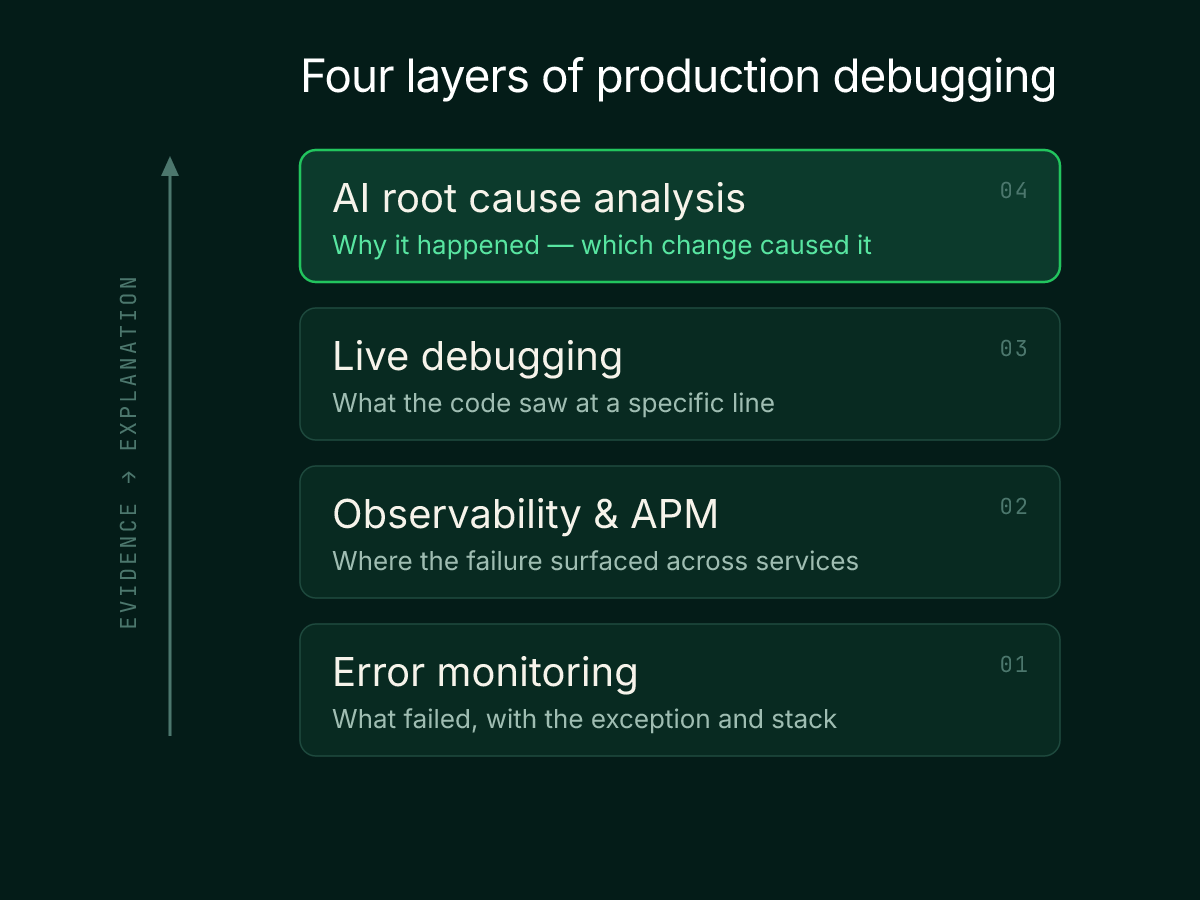
The category grew from step debuggers into telemetry, live instrumentation, and AI investigation, covered in Traversal's guide to AI debugging for production systems. Each layer answers a different question:
- Error monitoring: Shows what failed, with the exception and its stack.
- Observability and APM: Shows where the failure surfaced across services and hosts.
- Live debugging: Shows what the code saw at a specific line, without a redeploy.
- AI root cause analysis: Explains why the failure happened and which change caused it.
Why teams are adopting AI production debugging tools
Teams are adopting AI production debugging tools to explain failures whose cause sits outside the erroring service. In Traversal's view, that evidence spreads across owners faster than people can connect it.
The cause sits several hops from the symptom
In Traversal's experience, the service that throws the error is often not the service that changed. Kubernetes in production became the norm among container users, according to the CNCF annual cloud native survey for 2025. The hardest cases Traversal sees involve one request crossing several services and degrading quietly.
Evidence is scattered across tools
Logs, request-path data, deploys, tickets, and chat history live in different tools, so responders spend the incident assembling context. In Traversal's view, more telemetry rarely shortens diagnosis, because collection is seldom the bottleneck and explanation usually is. When the right signal is missing, the loop becomes adding a log and redeploying.
Slow diagnosis turns into expensive outages
Every minute spent locating the cause extends customer impact. In the 2026 Uptime Institute outage analysis, 57% of respondents to Uptime's 2025 survey said their most recent major outage cost more than $100,000. The longer a cause stays unknown, the longer recovery takes, which is why leaders track mean time to recovery.
What to look for in production debugging software
Look for software that explains the cause with checkable evidence, covers the path from symptom to change, and keeps its context current without manual upkeep.
1. Causal explanation beyond evidence collection
A good tool reasons about cause instead of surfacing correlations.
- Hypothesis testing: Checks each hypothesis against timing and topology.
- Cause versus symptom: Separates the originating change from downstream errors.
- Rejected explanations: Shows which hypotheses it ruled out, and why.
Why it matters: Correlated signals multiply as systems grow, and only causal checks show which one to act on.
2. Coverage across services, infrastructure, code, and changes
The tool should see every layer a failure can cross.
- Change context: Reads deploys, config changes, and feature flags.
- Dependency awareness: Knows which services call which.
- Code linkage: Connects a diagnosis to the commit or file involved.
Why it matters: A tool that sees one layer can only explain failures inside it.
3. Runtime evidence when the signal doesn't exist yet
When the needed data was never recorded, live debuggers like Lightrun and Datadog Live Debugger earn their place.
- Non-breaking capture: Collects values without pausing threads.
- No redeploy: Adds logs or snapshots to running code.
- PII redaction: Strips personal data before it leaves the process.
Why it matters: Some bugs only show up in variable values no log captured.
4. Context that maintains itself
Good context accumulates without engineers writing files for the agent. Traversal needs no extensive manual tuning and no markdown files: it auto-discovers most Knowledge Bank™ context after each investigation, leaving human input as last-mile refinement (see how Knowledge Bank™ learns context). A leading global crypto exchange found that competing AI SREs needed engineers to maintain large markdown libraries and keep tuning them as the system changed.
- Auto-discovered history: Learns runbooks and past incidents from each investigation.
- Human refinement: Lets engineers correct context as a last step.
- No prompt libraries: Requires no markdown files to maintain.
Why it matters: Hand-maintained context goes stale the moment the system changes.
What is the best AI tool for debugging?
The best AI tool for debugging depends on where the bug lives. For a code defect in one service, an error-to-PR agent like Sentry Seer or a coding assistant fits. For an incident that crosses services, an AI SRE that reasons causally over the whole environment, like Traversal, fits.
On synthetic microservice benchmarks, general-purpose LLM agents struggle to name the exact root cause. The OpenRCA 2.0 benchmark paper (June 2026 arXiv preprint) found that 11 frontier LLMs recovered the exact root-cause set in 20.7% of cases on average. The tests used fault-injection testbeds, not commercial products, and the authors caution that results don't automatically transfer to production.
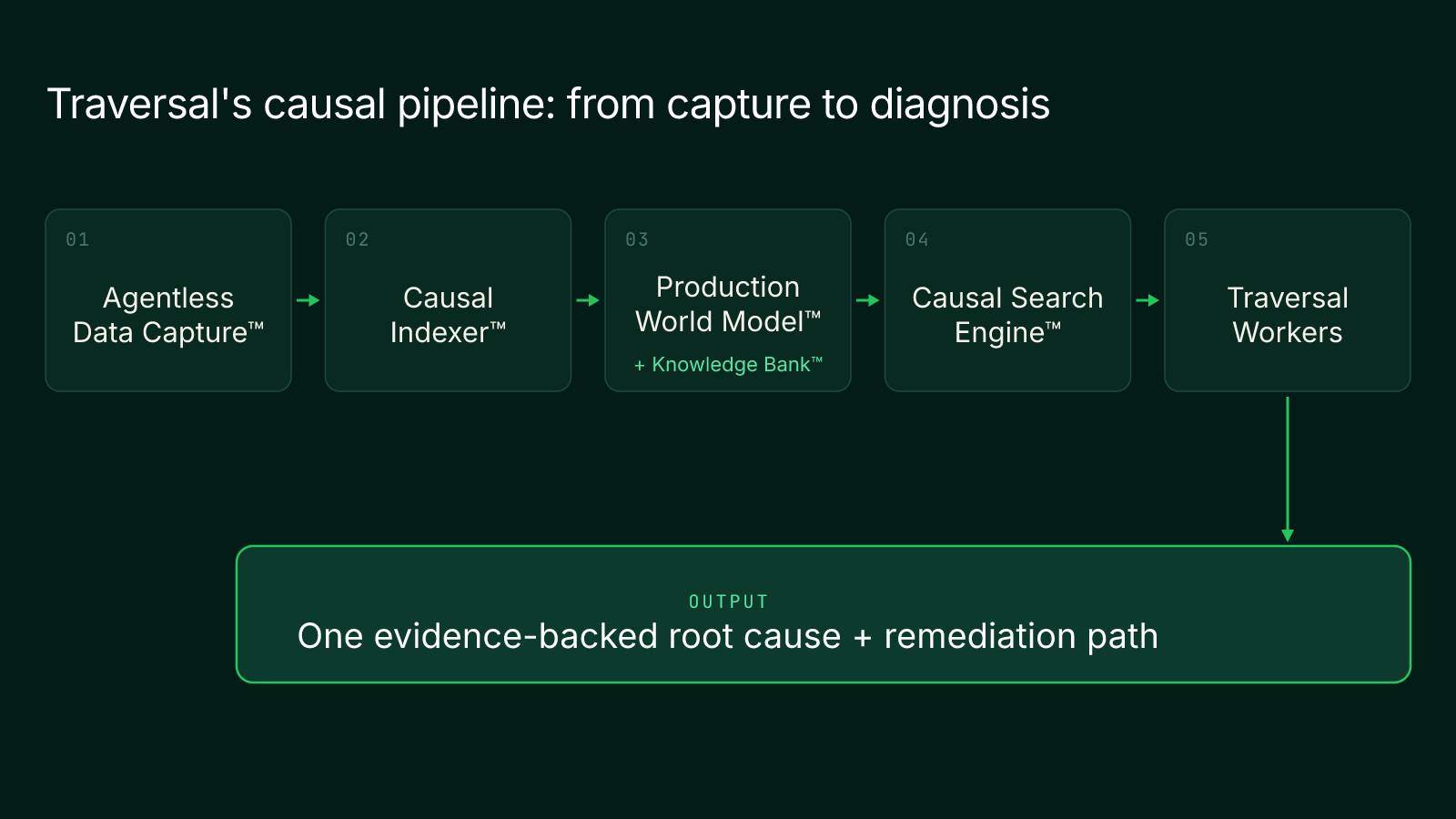
In Traversal's view, the limit is structural: a model wired to telemetry has to rebuild the system's dependencies during the incident itself. Traversal builds the dependency model ahead of time. Agentless Data Capture™ reads existing telemetry, code, and changes, and the Causal Indexer™ distills that data while keeping its causal signal.
The Production World Model™ maintains a live model of dependencies and baselines. Knowledge Bank™ enriches it with context that Traversal mostly auto-discovers after each investigation, with human input as last-mile refinement. The Causal Search Engine™ tests hypotheses in parallel across multi-hop paths and returns one evidence-backed root cause with a remediation path, which Traversal Workers deliver.
Choosing the right production debugging tool for your team
The right production debugging tool is the one that fits your team's workflow and removes its actual bottleneck.
- Locate where engineer hours go. Match the bottleneck to its layer.
- Code defects: Point to Sentry.
- Missing runtime values: Point to Lightrun or Datadog Live Debugger.
- Exploratory latency questions: Point to Honeycomb.
- Multi-hop incidents across owners: Point to Traversal.
- Test on your own past incidents. Demo datasets can hide hard cases; Traversal's guide to evaluating an AI SRE product explains the setup.
- Incident set: Replay high-severity incidents whose cause sat outside the alerting service.
- Ground truth: Compare each tool's diagnosis with the confirmed postmortem root cause.
- Measure recovery time and accuracy over alert counts.
- Mean time to recovery: Compare MTTR on similar incidents before and after.
- Diagnostic accuracy: Count diagnoses that matched the confirmed root cause.
Many teams can keep an evidence tool and add an explanation layer on top. Traversal fits as the explanation layer for large, distributed estates. It investigates, diagnoses, and recommends a remediation path, and your team decides and executes the fix.
If finding which change broke production is your slowest step, test it on your own environment. Book a demo to watch Traversal find the root cause of a multi-hop production failure, with an evidence chain you can verify.
FAQ
Scope the symptom and blast radius, check what changed recently, then follow the failing request across services until the evidence shows which change caused it. Mitigate first if users are affected, and confirm the cause before closing the incident.
Error monitoring captures exceptions and their context after they happen, while real-time debugging adds logs or snapshots to running code to collect data that was not recorded. Teams often use both: one to detect a bug and the other to inspect it in place.
Use non-breaking instrumentation, such as dynamic logs and snapshots that do not pause threads, together with read-only investigation over existing telemetry. These approaches avoid redeploys and restarts while the service continues serving traffic.
You may need more than one when evidence collection and explanation require different tools, such as an error tracker for code defects and an AI SRE for cross-service incidents. Many enterprise teams pair an evidence layer with an investigation layer.
Local debugging pauses code on one machine you control, while production debugging works on a live, distributed system that you cannot pause or fully reproduce. Production debugging therefore relies on telemetry, live instrumentation, and causal investigation.